.png?width=75&height=75&name=Untitled%20design%20(22).png)
Can customers see bill attachments when we pull bills from QBO?
When bills are pulled in from QBO, bill attachments default to “customer visible.”
Do bill attachments show up in the customer “Files” area?
No. Bill attachments are not included in the Files section that is shared with customers.
Does this matter for Fixed Price projects?
Generally, no. In Fixed Price projects, budgets and files are not made available to the customer, so the bill-attachment visibility setting won’t impact what the customer can see.
What about Cost Plus projects, can customers see files in the budget?
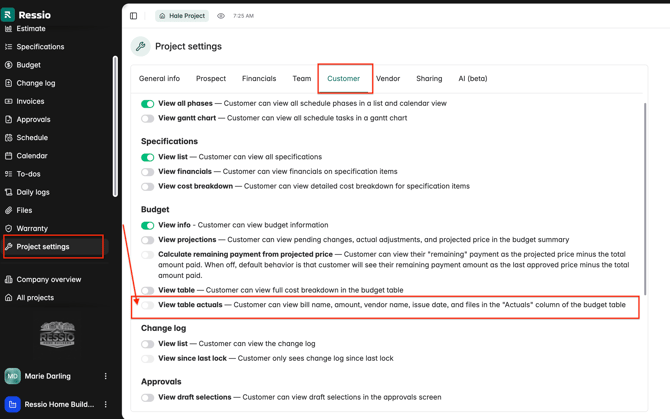
In Cost Plus projects, files are not visible in the budget by default. Customers will only see budget “actuals” details if you enable the customer visibility setting in Project Settings->Customer tab.
Which setting controls what customers can see in Cost Plus budgets?
In Project Settings -> Customer, scroll down to the Budget section and find the toggle:
“View table actuals" — Customer can view bill name, amount, vendor name, and issue date in the ‘Actuals’ column of the budget table.”
If enabled, customers can see the listed bill details in the Actuals column.
How do I control the visibility on file attachments on Invoices from actuals in cost plus?
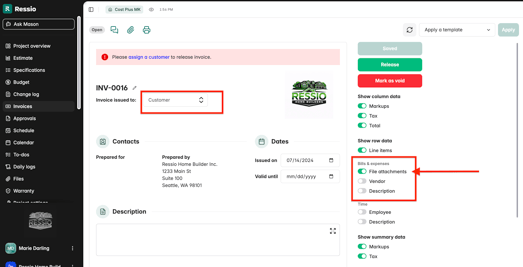
When sending out an invoice to your customer on cost-plus projects, you can control if they see the file attachment.
After creating the invoice, you will see a series of toggles on the left-hand side of the invoice. Under "Bills & expense" there will be a toggle for "File attachments", toggle that off if you DO NOT want the customer to see the attachment.
If you have any questions or need further assistance, contact our support team at support@ressiosoftware.com. We're here to help!