.png?width=75&height=75&name=Untitled%20design%20(22).png)
Understand cost codes (what they are and why they matter)
Table of contents
What cost codes are
Cost codes are labels you assign to estimate and budget line items so you can consistently track where money is being spent in a project.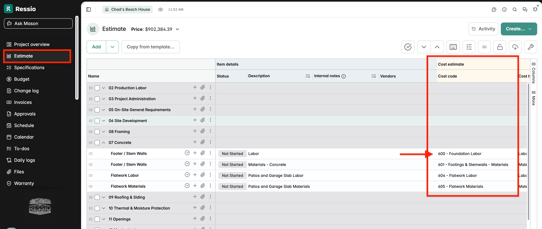
Think of a cost code as a shared “category” that connects the same type of work across:
- Your estimate
- Your budget
- Purchase orders and bills (actuals)
- Reports
- (If connected) your accounting system (ie. QuickBooks Online)
A cost code is usually a number + a short label for a trade or phase. Below are some examples:
Why cost codes matter in Ressio
Using cost codes consistently is what makes the Budget page, actuals tracking, and reporting accurate and useful.
Cost codes help you:
- See planned vs actual costs by trade/category (not just one big total)
- Catch overruns early (ie. framing is trending over budget)
- Keep your team aligned, everyone codes costs the same way
- Produce clean reports for internal review (and for clients when needed)
- Reduce accounting sync errors (when your cost code structure matches your accounting mapping)
Examples of cost codes
Your exact list will vary, but most builders use codes that represent major phases/trades, like:
- 0100 Pre-construction
- 0200 Demo
- 0300 Excavation
- 0400 Concrete
- 0500 Framing
- 0600 Roofing
- 0700 Plumbing
- 0800 Electrical
- 0900 Cabinets
Some companies also break these down further (recommended once your team is consistent), ie.:
- 0500 Framing labor
- 0510 Framing materials
Best practices before you start
Pick one structure and stick to it
-
Decide whether you’ll organize by broad trades, detailed trades, or by accounting chart-of-accounts mapping
-
Document the rules so every team member codes items the same way
Avoid creating “one-off” cost codes per project
Cost codes work best when you reuse the same list across projects so reporting is consistent.
If you use QuickBooks Online (QBO)
- Align your cost codes to how you want costs categorized in QBO
- Confirm mapping rules before you start entering real bills and POs
If you still have unanswered questions or need further assistance, please don't hesitate to reach out to our dedicated support team at support@ressiosoftware.com. We're here to help!