---
title: Markup vs. Margin in Estimate
description: Learn the difference between markup and margin in Ressio, how builder profit is calculated in estimates, and how markup and margin apply to cost-plus jobs.
---
[Skip to content](https://help.ressiosoftware.com/markup-vs.-margin-in-estimate#main-content)
English
Show submenu for translations
[Contact us](https://help.ressiosoftware.com/kb-tickets/new?hsLang=en)
.png?width=75&height=75&name=Untitled%20design%20(22).png)
Open main navigation
Close main navigation
- English
Show submenu for translations
- [Contact us](https://help.ressiosoftware.com/kb-tickets/new)
- [Go to ressiosoftware.com](https://www.ressiosoftware.com/)
[Go to ressiosoftware.com](https://www.ressiosoftware.com/)
Hello. How can we help?
- There are no suggestions because the search field is empty.
1. [Ressio Knowledge Base](https://help.ressiosoftware.com/?hsLang=en)
2. [Feature guides](https://help.ressiosoftware.com/feature-guides?hsLang=en)
3. [Estimate](https://help.ressiosoftware.com/feature-guides?hsLang=en#estimate)
# Markup vs. Margin in Estimate
## How builder profit is calculated, applied, and reported in your estimate
Understanding the difference between **markup** and **margin** is essential for accurately pricing projects and evaluating profitability in Ressio. While the two terms are closely related, they represent different ways of calculating and viewing builder profit.
This article explains the difference, shows how each is calculated, and outlines how markup and margin work inside Ressio.
---
#### Table of Contents
1. [Markup vs. Margin](https://help.ressiosoftware.com/markup-vs.-margin-in-estimate#markup-margin)
2. [Managing Markup in Estimate](https://help.ressiosoftware.com/markup-vs.-margin-in-estimate#managing-markup)
3. [Adjusting Project-Level Markups](https://help.ressiosoftware.com/markup-vs.-margin-in-estimate#adjusting)
1. [Modifying Individual Line Markups](https://help.ressiosoftware.com/markup-vs.-margin-in-estimate#modifying)
2. [Changing the Builder Profit Dollar Amount](https://help.ressiosoftware.com/markup-vs.-margin-in-estimate#changing-the)
4. [Markup vs. Margin for Cost-Plus Projects](https://help.ressiosoftware.com/markup-vs.-margin-in-estimate#markup-cost-plus)
5. [Markup vs. Margin for Fixed Price Projects](https://help.ressiosoftware.com/markup-vs.-margin-in-estimate#markup-fixed-priced)
6. [Creating Company Markups](https://help.ressiosoftware.com/markup-vs.-margin-in-estimate#creating-company)
---
#### Markup vs. Margin
**What is a markup?**
**Markup** is the percentage of profit added **on top of your costs**.
`Markup % = Profit ÷ Cost`
**How Markup Is Used in Ressio**
Markup is typically what builders **set and apply** in Ressio before locking the estimate:
- Applied at the **project level**
- Adjustable at the **individual cost item level**
- Commonly used for **cost-plus pricing** and consistent profit rules
**What is a margin?**
**Margin** represents profit as a percentage of the **final price (revenue)**.
`Margin % = Profit ÷ Revenue`
**⚠️ Margin** is not an editable field
**Markup vs. Margin Key Differences**
| **Concept** | **Based on** | **Use for** |
| --- | --- | --- |
| **Markup** | Cost | Pricing the job |
| **Margin** | Revenue | Measurability |
[back-to-top](https://help.ressiosoftware.com/markup-vs.-margin-in-estimate#back-to-top)
---
#### Managing Markup in the Estimate
Within the estimate, **Markup** and **Margin** appear as separate columns under the '**Profit Markups**' section.
You can:
- Apply **multiple markups** to a project
- View and edit **project-level markups** using the **Markups** button
- Adjust markup at the **individual line-item level**
- Enter **builder profit as a dollar amount**, and Ressio will automatically calculate the corresponding markup percentage
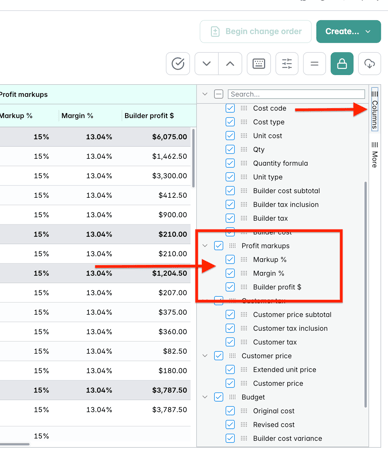
Markup and margin columns can be **shown or hidden**, just like other estimate fields.
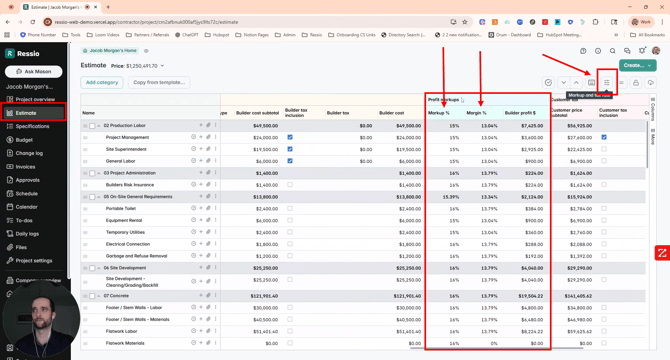
To change your view, you can go to the 'Columns' tab and hide and unhide any columns in the estimate. This includes Profit markups, Markups, Margin and Builder profit.
[back-to-top](https://help.ressiosoftware.com/markup-vs.-margin-in-estimate#back-to-top)
---
#### Adjusting Project-Level Markups
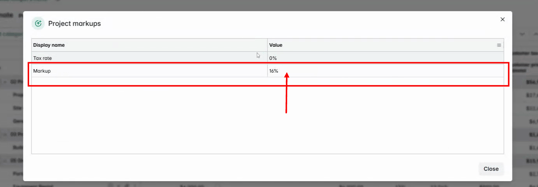
In the top right hand corner you will find the '**Markup and tax rate'** button. When you click there, you have the ability to add the Markup across the entire project.
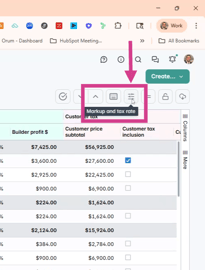
Double click into the cell under "**Value**" and add your percentage.
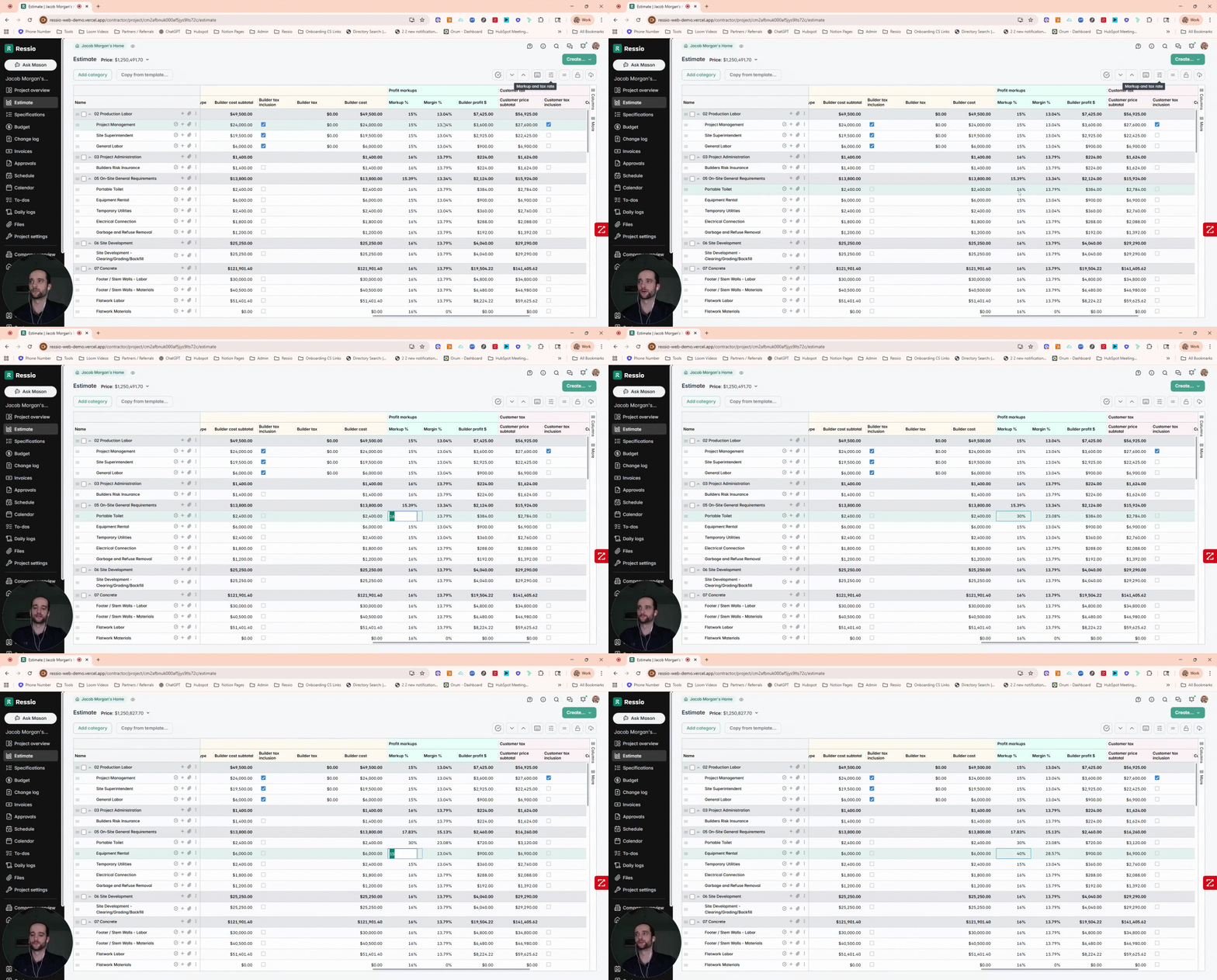
**Modifying Individual Line Markups**
Click into individual lines under markup and change the percentage.
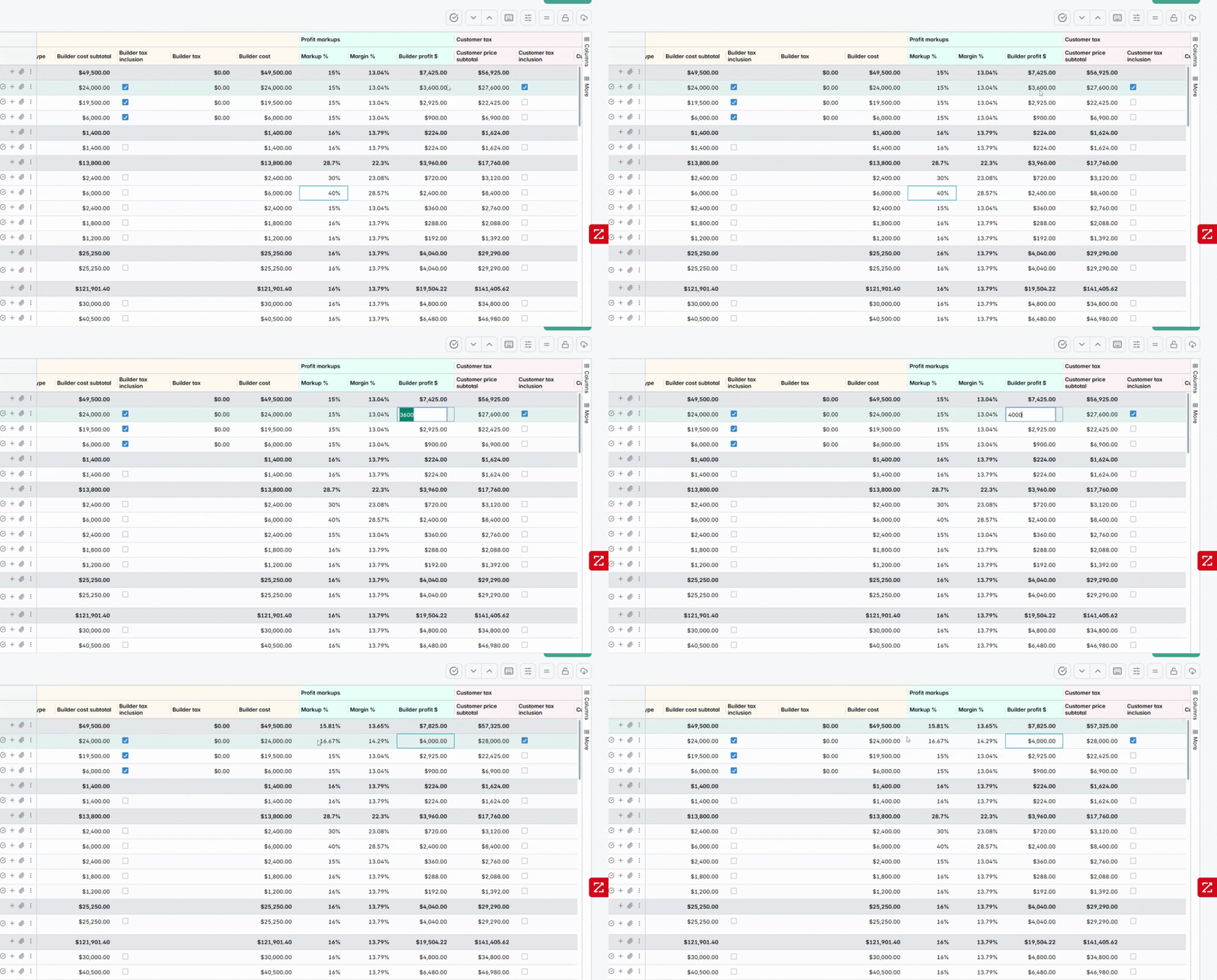
**Changing the Builder Profit Dollar Amount**
In addition to adjusting individual lines and percentages, you can modify the dollar amount on the builder profit side.
Ressio will automatically calculate the corresponding markup percentage
[back-to-top](https://help.ressiosoftware.com/markup-vs.-margin-in-estimate#back-to-top)
---
#### Markup & Margin for Cost-Plus Jobs
For **cost-plus projects**, markup plays a central role in how builder profit is calculated and invoiced in **Ressio**.
On cost-plus jobs:
- **Markup is applied to actual costs**, not a fixed contract total
- Builder profit increases or decreases as costs change
- Markup is typically **consistent across cost codes**, but can be adjusted when needed
Because pricing is driven by real costs, **markup—not margin—is the primary control lever** for profit on cost-plus work.
**Why Margin Still Matters**
Even on cost-plus jobs, margin is still an important **reporting and review metric**:
- Margin reflects how much profit you retain after costs are billed
- Margin will fluctuate as costs and markups change
- Reviewing margin helps validate that your markup strategy is achieving your profit goals
In other words:
- **Markup controls pricing**
- **Margin validates performance**
[back-to-top](https://help.ressiosoftware.com/markup-vs.-margin-in-estimate#back-to-top)
---
#### Markup vs. Margin for Fixed Priced Jobs
🎓 For details on how markup and margin are handled on fixed-price projects, see our article: **[Setting Up Fixed-Price Projects](https://help.ressiosoftware.com/setting-up-fixed-price-projects?hsLang=en).**
---
#### Creating Company Markups
If you would like to add Company Markups, please reach out to your Customer Success Coach.
[back-to-top](https://help.ressiosoftware.com/markup-vs.-margin-in-estimate#back-to-top)
---
If you have any questions or need further assistance, contact our support team at **support@ressiosoftware.com**. We're here to help!
- [Getting started](https://help.ressiosoftware.com/getting-started?hsLang=en)
- [Feature guides](https://help.ressiosoftware.com/feature-guides?hsLang=en#main-content)
- [Schedule](https://help.ressiosoftware.com/feature-guides?hsLang=en#schedule)
- [Estimate](https://help.ressiosoftware.com/feature-guides?hsLang=en#estimate)
- [Specs](https://help.ressiosoftware.com/feature-guides?hsLang=en#specs)
- [Budget](https://help.ressiosoftware.com/feature-guides?hsLang=en#budget)
- [Invoices](https://help.ressiosoftware.com/feature-guides?hsLang=en#invoices)
- [Approvals](https://help.ressiosoftware.com/feature-guides?hsLang=en#approvals)
- [Time Clock](https://help.ressiosoftware.com/feature-guides?hsLang=en#time-clock)
- [Calendar](https://help.ressiosoftware.com/feature-guides?hsLang=en#calendar)
- [Daily Log](https://help.ressiosoftware.com/feature-guides?hsLang=en#daily-log)
- [Change Orders](https://help.ressiosoftware.com/feature-guides?hsLang=en#change-orders)
- [Messaging & Notifications](https://help.ressiosoftware.com/feature-guides?hsLang=en#messaging-notifications)
- [Client Portal](https://help.ressiosoftware.com/feature-guides?hsLang=en#client-portal)
- [Settings](https://help.ressiosoftware.com/feature-guides?hsLang=en#settings)
- [Projects](https://help.ressiosoftware.com/feature-guides?hsLang=en#projects)
- [Selections](https://help.ressiosoftware.com/feature-guides?hsLang=en#selections)
- [Prospect management](https://help.ressiosoftware.com/feature-guides?hsLang=en#prospect-management)
- [Vendor Management](https://help.ressiosoftware.com/feature-guides?hsLang=en#vendor-management)
- [Cost Catalog](https://help.ressiosoftware.com/feature-guides?hsLang=en#cost-catalog)
- [To-dos](https://help.ressiosoftware.com/feature-guides?hsLang=en#to-dos)
- [Bid Management](https://help.ressiosoftware.com/feature-guides?hsLang=en#bid-management)
- [Plan hub](https://help.ressiosoftware.com/feature-guides?hsLang=en#plan-hub)
- [General](https://help.ressiosoftware.com/feature-guides?hsLang=en#general)
- [Proposals](https://help.ressiosoftware.com/feature-guides?hsLang=en#proposals)
- [Files](https://help.ressiosoftware.com/feature-guides?hsLang=en#files)
- [Ressio Payment Processing](https://help.ressiosoftware.com/feature-guides?hsLang=en#ressio-payment-processing)
- [Financial Tools & Services](https://help.ressiosoftware.com/feature-guides?hsLang=en#financial-tools-services)
- [Mason](https://help.ressiosoftware.com/feature-guides?hsLang=en#mason)
- [Reports](https://help.ressiosoftware.com/feature-guides?hsLang=en#reports)
- [Warranty](https://help.ressiosoftware.com/feature-guides?hsLang=en#warranty)
- [Automations](https://help.ressiosoftware.com/feature-guides?hsLang=en#automations)
- [FAQs](https://help.ressiosoftware.com/faqs?hsLang=en#main-content)
- [Vendors](https://help.ressiosoftware.com/faqs?hsLang=en#vendors)
- [Estimate](https://help.ressiosoftware.com/faqs?hsLang=en#estimate)
- [QuickBooks Online](https://help.ressiosoftware.com/faqs?hsLang=en#quickbooks-online)
- [Customers](https://help.ressiosoftware.com/faqs?hsLang=en#customers)
- [Files](https://help.ressiosoftware.com/faqs?hsLang=en#files)
- [Invoices](https://help.ressiosoftware.com/faqs?hsLang=en#invoices)
- [My account](https://help.ressiosoftware.com/faqs?hsLang=en#my-account)
- [Insurance](https://help.ressiosoftware.com/faqs?hsLang=en#insurance)
- [Time Clock](https://help.ressiosoftware.com/faqs?hsLang=en#time-clock)
- [Selections](https://help.ressiosoftware.com/faqs?hsLang=en#selections)
- [Templates](https://help.ressiosoftware.com/faqs?hsLang=en#templates)
- [Mason AI](https://help.ressiosoftware.com/faqs?hsLang=en#mason-ai)
- [Troubleshooting](https://help.ressiosoftware.com/troubleshooting?hsLang=en)
- [Integrations](https://help.ressiosoftware.com/integrations?hsLang=en#main-content)
- [QuickBooks Online](https://help.ressiosoftware.com/integrations?hsLang=en#quickbooks-online)
- [File Integrations](https://help.ressiosoftware.com/integrations?hsLang=en#file-integrations)
- [Sero](https://help.ressiosoftware.com/integrations?hsLang=en#sero)
- [Adaptive](https://help.ressiosoftware.com/integrations?hsLang=en#adaptive)
- [AI](https://help.ressiosoftware.com/integrations?hsLang=en#ai)
- [Account](https://help.ressiosoftware.com/account?hsLang=en)
[](http://ressiosoftware.com)
[www.ressiosoftware.com](http://www.ressiosoftware.com)
Copyright © 2026, Ressio Software